
Monitoring Oracle 26ai Database with Checkmk on Ubuntu 26.04
Introduction
Monitoring databases is critical for ensuring performance, availability, and troubleshooting. Checkmk, an open-source monitoring tool, is a powerful choice for monitoring Oracle 26ai databases running on Linux. In this guide, we’ll walk through the process of setting up Checkmk Community Edition on Ubuntu 26.04 to monitor an Oracle 26ai database including ASM hosted on another system.
By the end of this post, you’ll have a fully functional Checkmk installation with copy-paste code snippets to get everything running smoothly.
Prerequisites
Before we begin, ensure you have the following:
- Ubuntu 26.04 Server VM: Installed and configured. You can follow this guide for a streamlined setup.
- Oracle 26ai Database with ASM: Running on a separate VM. Refer to this Oracle 26ai setup guide for installation instructions.
- SSH Access: Root or sudo access to both the Ubuntu 26.04 server and the Oracle 26ai VM.
- Network Connectivity: Ensure the Ubuntu server can communicate with the Oracle VM (e.g., via IP or hostname).
Step 1: Download and Install Checkmk Community Edition on the monitoring server
Download & Install Checkmk
Download the .deb package and install Checkmk Community Edition on the Ubuntu VM:
# run as root
wget https://download.checkmk.com/checkmk/2.5.0p10/check-mk-community-2.5.0p10_0.resolute_amd64.deb
apt -y install ./check-mk-community-2.5.0p10_0.resolute_amd64.deb
omd version
Sample Output (click to expand):
root@lin3:~# # run as root
wget https://download.checkmk.com/checkmk/2.5.0p10/check-mk-community-2.5.0p10_0.resolute_amd64.deb
apt install ./check-mk-community-2.5.0p10_0.resolute_amd64.deb
omd version
--2026-08-05 14:32:28--  https://download.checkmk.com/checkmk/2.5.0p10/check-mk-community-2.5.0p10_0.resolute_amd64.deb
Resolving download.checkmk.com (download.checkmk.com)... 45.133.11.29
Connecting to download.checkmk.com (download.checkmk.com)|45.133.11.29|:443... connected.
HTTP request sent, awaiting response... 200 OK
Length: 331054226 (316M) [application/vnd.debian.binary-package]
Saving to: ‘check-mk-community-2.5.0p10_0.resolute_amd64.deb’

check-mk-community-2.5.0p10_0 100%[==============================================>] 315.72M  10.7MB/s    in 31s

2026-08-05 14:32:59 (10.0 MB/s) - ‘check-mk-community-2.5.0p10_0.resolute_amd64.deb’ saved [331054226/331054226]

Note, selecting 'check-mk-community-2.5.0p10' instead of './check-mk-community-2.5.0p10_0.resolute_amd64.deb'
The following packages were automatically installed and are no longer required:
  linux-image-7.0.0-27-generic             linux-modules-7.0.0-27-generic  linux-tools-7.0.0-27-generic
  linux-main-modules-zfs-7.0.0-27-generic  linux-tools-7.0.0-27
Use 'apt autoremove' to remove them.

Installing:
  check-mk-community-2.5.0p10

Installing dependencies:
  apache2            libaprutil1-dbd-sqlite3  libfsverity0        librpmio10    php8.5-cgi       rpcbind
  apache2-bin        libaprutil1-ldap         libgvc7             librpmsign10  php8.5-cli       rpm
  apache2-data       libaprutil1t64           libgvplugin-gd8     libsodium23   php8.5-common    rpm-common
  apache2-utils      libargon2-1              libgvplugin-pango8  libxdot4      php8.5-gd        rpm2cpio
  debugedit          libcdt6                  libgvpr2            php-cgi       php8.5-readline  samba-common
  dialog             libcgraph8               liblua5.3-0         php-cli       php8.5-sqlite3   samba-common-bin
  freeradius-common  libdbi-perl              libpathplan4        php-common    php8.5-xml       smbclient
  freeradius-config  libdialog15              libpq5              php-gd        python3-ldb      tdb-tools
  freeradius-utils   libevent-2.1-7t64        librpm-sequoia-1    php-pear      python3-samba    traceroute
  graphviz           libfl2                   librpm10            php-sqlite3   python3-talloc   xinetd
  libapr1t64         libfreeradius3           librpmbuild10       php-xml       python3-tdb

Suggested packages:
  apache2-doc              gsfonts        libnet-daemon-perl     alien     heimdal-clients
  apache2-suexec-pristine  graphviz-doc   libsql-statement-perl  elfutils  cifs-utils
  | apache2-suexec-custom  libmldbm-perl  libpq-oauth            rpmlint

Summary:
  Upgrading: 0, Installing: 66, Removing: 0, Not Upgrading: 0
  Download size: 23.2 MB / 354 MB
  Space needed: 102 MB / 83.0 GB available

Continue? [Y/n]
...
Processing triggers for ufw (0.36.2-9build1)…
Processing triggers for man-db (2.13.1-1build1)…
Processing triggers for dbus (1.16.2-2ubuntu4)…
Processing triggers for libc-bin (2.43-2ubuntu2.3)…
Processing triggers for php8.5-cli (8.5.4-0ubuntu1.2)…
Processing triggers for php8.5-cgi (8.5.4-0ubuntu1.2)…
Notice: Download is performed unsandboxed as root as file '/root/check-mk-community-2.5.0p10_0.resolute_amd64.deb' couldn't be accessed by user '_apt'. - pkgAcquire::Run (13: Permission denied)
OMD - Open Monitoring Distribution Version 2.5.0p10.community
root@lin3:~#
Initialize the Checkmk Site
Create a new Checkmk site (replace mysite with your preferred site name):
# run as root
omd create mysite
# start the site
omd start mysite
Sample Output (click to expand):
root@lin3:~# # run as root
omd create mysite
# start the site
omd start mysite
Adding /opt/omd/sites/mysite/tmp to /etc/fstab.
Creating temporary filesystem /omd/sites/mysite/tmp...OK
Executing post-create script "01_create-sample-config.py"...OK
Executing post-create script "02_message-broker-certs"...OK
Updating core configuration...
Generating configuration for core (type nagios)...
Precompiling host checks...OK
Restarting Apache...OK
Created new site mysite with version 2.5.0p10.community.

  The site can be started with omd start mysite.
  The default web UI is available at http://lin3.fritz.box/mysite/

  The admin user for the web applications is cmkadmin with password: xxx
  For command line administration of the site, log in with 'omd su mysite'.
  After logging in, you can change the password for cmkadmin with 'cmk-passwd cmkadmin'.

Starting agent-receiver...OK
Starting mkeventd...OK
Starting rrdcached...OK
Starting redis...OK
Starting npcd...OK
Starting automation-helper...OK
Starting ui-job-scheduler...OK
Starting nagios...OK
Starting apache...OK
Starting crontab...OK
root@lin3:~#
Access the Checkmk web interface by navigating to a URL similar to:
Log in with the default credentials:
- Username:
cmkadmin - Password: as shown in the previous step
The password can be changed now (User => Change password)
Step 2: Configure Checkmk for Oracle 26ai Monitoring
Install Oracle Monitoring Agent and the mk_oracle plugin
Checkmk uses the MKS (Checkmk Agent Plugins) to monitor Oracle databases. Install the agent and the agent plugin:
On the Oracle 26ai VM:
# run as root
# install the checkmk agent
wget lin3.fritz.box/mysite/check_mk/agents/check-mk-agent-2.5.0p10-1.noarch.rpm
dnf -y install ./check-mk-agent-2.5.0p10-1.noarch.rpm

# create monitoring users on the ASM and CDB
su - grid -c '
sqlplus -S / as sysasm <<EOF
create user cmk_asm identified by changeme;
grant sysdba to cmk_asm;
EXIT;
EOF
'
su - oracle -c '
sql -S / as sysdba <<EOF
create user c##checkmk identified by changeme;
alter user c##checkmk set container_data=all container=current;
grant select_catalog_role to c##checkmk container=all;
grant create session to c##checkmk container=all;
EXIT;
EOF
'

# create the Oracle Wallet to store the CDB password
echo -e 'mysecret1\nmysecret1'|/u01/app/oracle/product/23.26.0/dbhome_1/bin/mkstore -wrl /etc/check_mk/oracle_wallet -create
echo mysecret1|/u01/app/oracle/product/23.26.0/dbhome_1/bin/mkstore -wrl /etc/check_mk/oracle_wallet -createCredential orcl c\#\#checkmk changeme
chgrp -R oinstall /etc/check_mk/oracle_wallet
chmod g+x /etc/check_mk/oracle_wallet
chmod -R g+r /etc/check_mk/oracle_wallet

# create checkmk config files (sqlnet.ora, tnsnames.ora and mk_oracle.cfg
cat > /etc/check_mk/sqlnet.ora <<EOF
LOG_DIRECTORY_CLIENT = /var/log/check_mk/oracle_client
DIAG_ADR_ENABLED = OFF

SQLNET.WALLET_OVERRIDE = TRUE
WALLET_LOCATION =
 (SOURCE=
   (METHOD = FILE)
   (METHOD_DATA = (DIRECTORY=/etc/check_mk/oracle_wallet))
 )
EOF
mkdir -p /var/log/check_mk/oracle_client
chown -R oracle:oinstall /var/log/check_mk
cat > /etc/check_mk/tnsnames.ora <<EOF
+ASM =
  (DESCRIPTION =
    (ADDRESS = (PROTOCOL = TCP)(HOST = 127.0.0.1)(PORT = 1521))
    (CONNECT_DATA =
      (SERVER = DEDICATED)
      (SERVICE_NAME = +ASM)
    )
  )

orcl =
  (DESCRIPTION =
    (ADDRESS = (PROTOCOL = TCP)(HOST = 127.0.0.1)(PORT = 1521))
    (CONNECT_DATA =
      (SERVER = DEDICATED)
      (SERVICE_NAME = orcl.fritz.box)
    )
  )
EOF
cat >/etc/check_mk/mk_oracle.cfg <<EOF
DBUSER='/:'
ASMUSER='cmk_asm:changeme:SYSDBA'
EOF
# adjust permissions
chgrp oinstall /etc/check_mk/sqlnet.ora /etc/check_mk/tnsnames.ora

# install the checkmk oracle agent plugin
mkdir /usr/lib/check_mk_agent/plugins/60
wget -P /usr/lib/check_mk_agent/plugins/60 lin3.fritz.box/mysite/check_mk/agents/plugins/mk_oracle
chmod +x /usr/lib/check_mk_agent/plugins/60/mk_oracle
Sample Output (click to expand):
[root@lin1 ~]# # run as root
[root@lin1 ~]# # install the checkmk agent
[root@lin1 ~]# wget lin3.fritz.box/mysite/check_mk/agents/check-mk-agent-2.5.0p10-1.noarch.rpm
--2026-08-05 15:35:27--  http://lin3.fritz.box/mysite/check_mk/agents/check-mk-agent-2.5.0p10-1.noarch.rpm
Resolving lin3.fritz.box (lin3.fritz.box)... 11.1.1.177
Connecting to lin3.fritz.box (lin3.fritz.box)|11.1.1.177|:80... connected.
HTTP request sent, awaiting response... 200 OK
Length: 5765323 (5.5M) [application/x-redhat-package-manager]
Saving to: ‘check-mk-agent-2.5.0p10-1.noarch.rpm’

check-mk-agent-2.5.0p10-1.noarch.r 100%[=============================================================>]   5.50M  --.-KB/s    in 0.05s

2026-08-05 15:35:27 (113 MB/s) - ‘check-mk-agent-2.5.0p10-1.noarch.rpm’ saved [5765323/5765323]

[root@lin1 ~]# dnf -y install ./check-mk-agent-2.5.0p10-1.noarch.rpm
Last metadata expiration check: 1 day, 4:18:07 ago on Tue 04 Aug 2026 11:17:24 AM CEST.
Dependencies resolved.
=========================================================================================================================================
 Package                             Architecture                Version                         Repository                         Size
=========================================================================================================================================
Installing:
 check-mk-agent                      noarch                      2.5.0p10-1                      @commandline                      5.5 M

Transaction Summary
=========================================================================================================================================
Install  1 Package

Total size: 5.5 M
Installed size: 5.5 M
Downloading Packages:
Running transaction check
Transaction check succeeded.
Running transaction test
Transaction test succeeded.
Running transaction
  Preparing        :                                                                                                                 1/1
  Running scriptlet: check-mk-agent-2.5.0p10-1.noarch                                                                                1/1
  Installing       : check-mk-agent-2.5.0p10-1.noarch                                                                                1/1
  Running scriptlet: check-mk-agent-2.5.0p10-1.noarch                                                                                1/1

Deploying agent controller: /usr/bin/cmk-agent-ctl
Deploying systemd units: cmk-agent-ctl-daemon.service check-mk-agent-async.service check-mk-agent@.service check-mk-agent.socket
Deployed systemd
Creating/updating 'cmk-agent' user account ...

WARNING: The agent controller is operating in an insecure mode! To secure the connection run `cmk-agent-ctl register`.

Activating systemd unit 'cmk-agent-ctl-daemon.service'...
Created symlink /etc/systemd/system/multi-user.target.wants/cmk-agent-ctl-daemon.service → /usr/lib/systemd/system/cmk-agent-ctl-daemon.service.
Activating systemd unit 'check-mk-agent-async.service'...
Created symlink /etc/systemd/system/multi-user.target.wants/check-mk-agent-async.service → /usr/lib/systemd/system/check-mk-agent-async.service.
Activating systemd unit 'check-mk-agent.socket'...
Created symlink /etc/systemd/system/sockets.target.wants/check-mk-agent.socket → /usr/lib/systemd/system/check-mk-agent.socket.

  Verifying        : check-mk-agent-2.5.0p10-1.noarch                                                                                1/1

Installed:
  check-mk-agent-2.5.0p10-1.noarch

Complete!
[root@lin1 ~]#
[root@lin1 ~]# # create monitoring users on the ASM and CDB
[root@lin1 ~]# su - grid -c '
> sqlplus -S / as sysasm <<EOF
> create user cmk_asm identified by changeme;
> grant sysdba to cmk_asm;
> EXIT;
> EOF
> '

User created.


Grant succeeded.

[root@lin1 ~]# su - oracle -c '
> sql -S / as sysdba <<EOF
> create user c##checkmk identified by changeme;
> alter user c##checkmk set container_data=all container=current;
> grant select_catalog_role to c##checkmk container=all;
> grant create session to c##checkmk container=all;
> EXIT;
> EOF
> '


User C##CHECKMK created.


User C##CHECKMK altered.


Grant succeeded.


Grant succeeded.

[root@lin1 ~]#
[root@lin1 ~]# # create the Oracle Wallet to store the CDB password
[root@lin1 ~]# echo -e 'mysecret1\nmysecret1'|/u01/app/oracle/product/23.26.0/dbhome_1/bin/mkstore -wrl /etc/check_mk/oracle_wallet -create
Oracle Secret Store Tool Release 23.0.0.0.0 - Production
Version 23.0.0.0.0
Copyright (c) 2004, 2025, Oracle and/or its affiliates. All rights reserved.

Enter password:
Enter password again:
[root@lin1 ~]# echo mysecret1|/u01/app/oracle/product/23.26.0/dbhome_1/bin/mkstore -wrl /etc/check_mk/oracle_wallet -createCredential orcl c\#\#checkmk changeme
Oracle Secret Store Tool Release 23.0.0.0.0 - Production
Version 23.0.0.0.0
Copyright (c) 2004, 2025, Oracle and/or its affiliates. All rights reserved.

Enter wallet password:
[root@lin1 ~]# chgrp -R oinstall /etc/check_mk/oracle_wallet
[root@lin1 ~]# chmod g+x /etc/check_mk/oracle_wallet
[root@lin1 ~]# chmod -R g+r /etc/check_mk/oracle_wallet
[root@lin1 ~]#
[root@lin1 ~]# # create checkmk config files (sqlnet.ora, tnsnames.ora and mk_oracle.cfg
[root@lin1 ~]# cat > /etc/check_mk/sqlnet.ora <<EOF
> LOG_DIRECTORY_CLIENT = /var/log/check_mk/oracle_client
> DIAG_ADR_ENABLED = OFF
>
> SQLNET.WALLET_OVERRIDE = TRUE
> WALLET_LOCATION =
>  (SOURCE=
>    (METHOD = FILE)
>    (METHOD_DATA = (DIRECTORY=/etc/check_mk/oracle_wallet))
>  )
> EOF
[root@lin1 ~]# mkdir -p /var/log/check_mk/oracle_client
[root@lin1 ~]# chown -R oracle:oinstall /var/log/check_mk
[root@lin1 ~]# cat > /etc/check_mk/tnsnames.ora <<EOF
> +ASM =
>   (DESCRIPTION =
>     (ADDRESS = (PROTOCOL = TCP)(HOST = 127.0.0.1)(PORT = 1521))
>     (CONNECT_DATA =
>       (SERVER = DEDICATED)
>       (SERVICE_NAME = +ASM)
>     )
>   )
>
> orcl =
>   (DESCRIPTION =
>     (ADDRESS = (PROTOCOL = TCP)(HOST = 127.0.0.1)(PORT = 1521))
>     (CONNECT_DATA =
>       (SERVER = DEDICATED)
>       (SERVICE_NAME = orcl.fritz.box)
>     )
>   )
> EOF
[root@lin1 ~]# cat >/etc/check_mk/mk_oracle.cfg <<EOF
> DBUSER='/:'
> ASMUSER='cmk_asm:changeme:SYSDBA'
> EOF
[root@lin1 ~]# # adjust permissions
[root@lin1 ~]# chgrp oinstall /etc/check_mk/sqlnet.ora /etc/check_mk/tnsnames.ora
[root@lin1 ~]#
[root@lin1 ~]# # install the checkmk oracle agent plugin
[root@lin1 ~]# mkdir /usr/lib/check_mk_agent/plugins/60
[root@lin1 ~]# wget -P /usr/lib/check_mk_agent/plugins/60 lin3.fritz.box/mysite/check_mk/agents/plugins/mk_oracle
--2026-08-05 15:35:52--  http://lin3.fritz.box/mysite/check_mk/agents/plugins/mk_oracle
Resolving lin3.fritz.box (lin3.fritz.box)... 11.1.1.177
Connecting to lin3.fritz.box (lin3.fritz.box)|11.1.1.177|:80... connected.
HTTP request sent, awaiting response... 200 OK
Length: 145178 (142K) [text/plain]
Saving to: ‘/usr/lib/check_mk_agent/plugins/60/mk_oracle’

mk_oracle                          100%[=============================================================>] 141.78K  --.-KB/s    in 0.001s

2026-08-05 15:35:52 (131 MB/s) - ‘/usr/lib/check_mk_agent/plugins/60/mk_oracle’ saved [145178/145178]

[root@lin1 ~]# chmod +x /usr/lib/check_mk_agent/plugins/60/mk_oracle
[root@lin1 ~]#
On the Checkmk Server:
- Add the Oracle VM as a Host:
- Log in to the Checkmk web interface.
- Navigate to Setup > Hosts > Add host.
- Enter the IP address or hostname of the Oracle VM.
- Click Save & run Service Discovery.
- Enable Oracle Checks:
- On the Service Discovery Page select: Accept All
- Then go to Changes > Activate Pending Changes
- Secure Agent Communication:
- Create a registration password in the GUI (Setup>Users>Edit agent_registration>Create random secret > save)
- on the Oracle host run:
cmk-agent-ctl register --server lin3.fritz.box --site mysite --hostname lin1.fritz.box --user agent_registration --trust-cert(and enter the password from the clipboard)
Step 3: Verify Oracle 26ai Monitoring
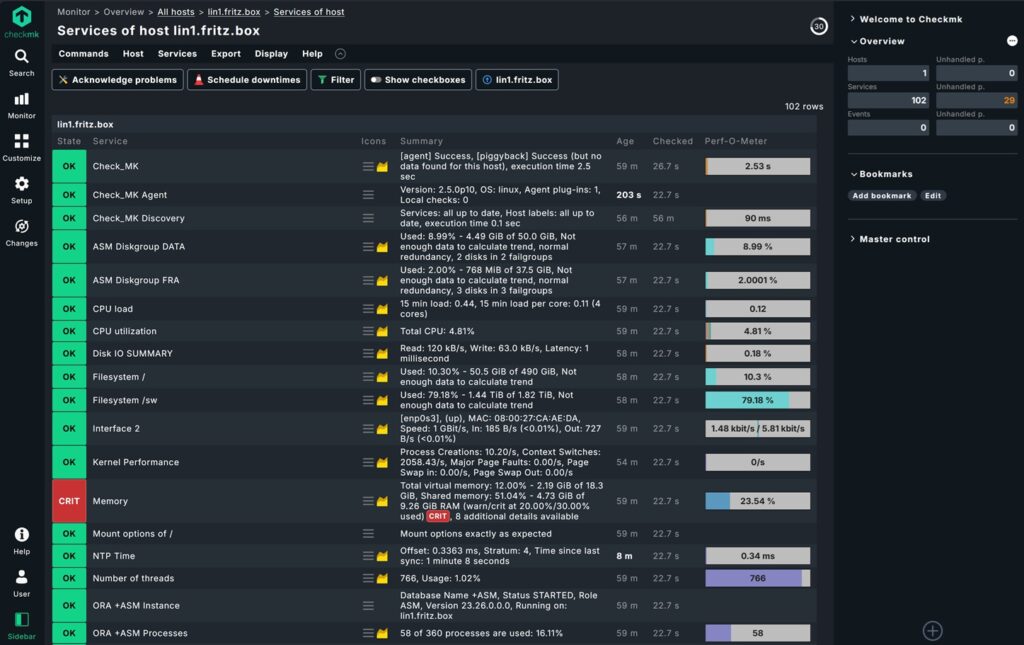
- Check Host Status:
- Navigate to Monitor > All hosts in the Checkmk web interface.
- Select your Oracle VM host. You should see services related to Oracle (e.g.,
Oracle Tablespaces,Oracle Performance).
Troubleshooting
The following commands can be used to test the connection from mk_oracle to the databases:
# run as root ion the database server
export MK_CONFDIR="/etc/check_mk/"; export MK_VARDIR="/var/lib/check_mk_agent/"
/usr/lib/check_mk_agent/plugins/60/mk_oracle -t --no-spool
Sample Failure Output (click to expand):
[root@lin1 ~]# /usr/lib/check_mk_agent/plugins/60/mk_oracle -t --no-spool
<<<oracle_instance>>>
<<<oracle_sessions>>>
<<<oracle_logswitches>>>
<<<oracle_undostat>>>
<<<oracle_recovery_area>>>
<<<oracle_processes>>>
<<<oracle_recovery_status>>>
<<<oracle_longactivesessions>>>
<<<oracle_dataguard_stats>>>
<<<oracle_performance>>>
<<<oracle_locks>>>
<<<oracle_systemparameter>>>
<<<oracle_tablespaces>>>
<<<oracle_rman>>>
<<<oracle_jobs>>>
<<<oracle_resumable>>>
<<<oracle_iostats>>>
<<<oracle_instance>>>
<<<oracle_processes>>>
<<<oracle_asm_diskgroup>>>
    Logindetails:           /@orcl

---checking permissions-------------------------------------------------
see https://checkmk.atlassian.net/wiki/spaces/KB/pages/70582273/Troubleshooting+mk+oracle+for+Windows+and+Linux

* sqlplus binary: /u01/app/oracle/product/23.26.0/dbhome_1/bin/sqlplus
* sqlplus binary owner: oracle
* change user: true
* $TNS_ADMIN: /etc/check_mk/
* user "oracle" can read /etc/check_mk//sqlnet.ora
* user "oracle" can read /etc/check_mk//tnsnames.ora

* test-login does not work!

  Could not login. In case you are using a wallet to connect, there might be a permission error.
  Make sure that the wallet folder can be read and executed by user "oracle" and
  the files inside the wallet can be read by the user.
  Consult your ora files for hints where the wallet is located:
  /etc/check_mk//sqlnet.ora
  /etc/check_mk//tnsnames.ora

------------------------------------------------------------------------

---login----------------------------------------------------------------
    Operating System:       Linux
    ORACLE_HOME (GI):       /u01/app/oracle/product/23.26.0/dbhome_1
    Logincheck to Instance: orcl
    Version:
    Error Message:          ORCL|FAILURE|ERROR: ORA-01017: invalid credential or not authorized; logon denied Help: https://docs
    SYNC_SECTIONS:          instance sessions logswitches undostat recovery_area processes recovery_status longactivesessions dataguard_stats performance locks systemparameter
    ASYNC_SECTIONS:         tablespaces rman jobs resumable iostats
------------------------------------------------------------------------

[root@lin1 ~]#
Sample Output Success (click to expand):
[root@lin1 ~]# export MK_CONFDIR="/etc/check_mk/"; export MK_VARDIR="/var/lib/check_mk_agent/"
[root@lin1 ~]# /usr/lib/check_mk_agent/plugins/60/mk_oracle -t --no-spool
<<<oracle_instance>>>
<<<oracle_sessions>>>
<<<oracle_logswitches>>>
<<<oracle_undostat>>>
<<<oracle_recovery_area>>>
<<<oracle_processes>>>
<<<oracle_recovery_status>>>
<<<oracle_longactivesessions>>>
<<<oracle_dataguard_stats>>>
<<<oracle_performance>>>
<<<oracle_locks>>>
<<<oracle_systemparameter>>>
<<<oracle_tablespaces>>>
<<<oracle_rman>>>
<<<oracle_jobs>>>
<<<oracle_resumable>>>
<<<oracle_iostats>>>
<<<oracle_instance>>>
<<<oracle_processes>>>
<<<oracle_asm_diskgroup>>>

---checking permissions-------------------------------------------------
see https://checkmk.atlassian.net/wiki/spaces/KB/pages/70582273/Troubleshooting+mk+oracle+for+Windows+and+Linux

* sqlplus binary: /u01/app/23.26.0/grid/bin/sqlplus
* sqlplus binary owner: grid
* change user: true
* $TNS_ADMIN: /etc/check_mk/
* user "grid" can read /etc/check_mk//sqlnet.ora
* user "grid" can read /etc/check_mk//tnsnames.ora

* test login works
------------------------------------------------------------------------

---login----------------------------------------------------------------
    Operating System:       Linux
    ORACLE_HOME (GI):       /u01/app/23.26.0/grid
    Logincheck to Instance: +ASM
    Version:
    Login ok User:          SYS on lin1.fritz.box Instance +ASM
    SYNC_SECTIONS:          instance processes
    ASYNC_SECTIONS:         asm_diskgroup
------------------------------------------------------------------------


---checking permissions-------------------------------------------------
see https://checkmk.atlassian.net/wiki/spaces/KB/pages/70582273/Troubleshooting+mk+oracle+for+Windows+and+Linux

* sqlplus binary: /u01/app/oracle/product/23.26.0/dbhome_1/bin/sqlplus
* sqlplus binary owner: oracle
* change user: true
* $TNS_ADMIN: /etc/check_mk/
* user "oracle" can read /etc/check_mk//sqlnet.ora
* user "oracle" can read /etc/check_mk//tnsnames.ora

* test login works
------------------------------------------------------------------------

---login----------------------------------------------------------------
    Operating System:       Linux
    ORACLE_HOME (GI):       /u01/app/oracle/product/23.26.0/dbhome_1
    Logincheck to Instance: orcl
    Version:
    Login ok User:          C##CHECKMK on lin1.fritz.box Instance orcl
    SYNC_SECTIONS:          instance sessions logswitches undostat recovery_area processes recovery_status longactivesessions dataguard_stats performance locks systemparameter
    ASYNC_SECTIONS:         tablespaces rman jobs resumable iostats
------------------------------------------------------------------------

[root@lin1 ~]#
Useful resources
Conclusion
You’ve now successfully set up Checkmk Community Edition on Ubuntu 26.04 to monitor an Oracle 26ai database running on a separate VM. This setup ensures you can track database performance, storage, and availability in real time.
Next Steps:
- Explore Checkmk’s dashboards and alerting rules to customize your monitoring.
- Set up notifications (e.g., email or Slack) for critical alerts.
- Consider integrating Checkmk with other tools like Grafana for advanced visualization.
Call to Action:
Have you tried monitoring Oracle 26ai with Checkmk? Share your experiences or questions in the comments below!
Leave a Reply