Setup of the RedHat Ansible Automation Platform (AAP)
This post shows how to install the current version (2.6) of the RedHat Ansible Automation Platform (AAP) on Linux.
There a different types of installation scenarious possible. On a production server multiple virtual environments or even multiple physical machines should be used. For this test environment we can install all into one VirtualBox VM running RedHat Enterprise Linux 9.7. The installation steps for setting up the VM is described in this blog post.
Increasing the memory of the VM
In the default configuration our VM is configured to have 8 GB of RAM. To increase the RAM to 16 GB we can run the following command on the host system.
set "VHOST="
(set /p VHOST=Enter VM name ^(e.g. lin1^):
call vboxmanage controlvm %VHOST% shutdown         &rem Power down the VM and wait
timeout /T 10 /NOBREAK
call vboxmanage modifyvm %VHOST% --memory=16384    &rem Set the VM RAM to 16 GB
call vboxmanage startvm %VHOST%)                   &rem Power up the Virtual Machine
Downloading the Installation Files
We need to download the “AAP Containerized Setup Bundle” version 2.6 for RHEL 9 from this page. To be able to download the software we can create a free RedHat Developer account here.
Starting the Installation
The following steps need to be run as root on the VM:
# install the Ansible Core package
dnf -y install ansible-core
# create the user which runs the installation and application processes
adduser -G vboxsf aap
echo 'aap:changeme'|chpasswd
# allow the user aap to run commands as root (with sudo)
echo 'aap ALL=(ALL) NOPASSWD: ALL' > /etc/sudoers.d/aap
chmod 440 /etc/sudoers.d/aap
Sample Output (click to expand):
[root@lin2 ~]# # install the Ansible Core package
dnf -y install ansible-core
# create the user which runs the installation and application processes
adduser -G vboxsf aap
echo 'aap:changeme'|chpasswd
# allow the user aap to run commands as root (with sudo)
echo 'aap ALL=(ALL) NOPASSWD: ALL' > /etc/sudoers.d/aap
chmod 440 /etc/sudoers.d/aap
Updating Subscription Management repositories.
Last metadata expiration check: 7:17:53 ago on Wed 22 Apr 2026 01:31:21 PM CEST.
Dependencies resolved.
=========================================================================================================================
 Package                       Architecture    Version                   Repository                                 Size
=========================================================================================================================
Installing:
 ansible-core                  x86_64          1:2.14.18-1.el9           rhel-9-for-x86_64-appstream-rpms          2.6 M
Installing dependencies:
 git-core                      x86_64          2.47.3-1.el9_6            rhel-9-for-x86_64-appstream-rpms          4.7 M
 python3-cffi                  x86_64          1.14.5-5.el9              rhel-9-for-x86_64-baseos-rpms             257 k
 python3-cryptography          x86_64          36.0.1-5.el9_6            rhel-9-for-x86_64-baseos-rpms             1.2 M
 python3-packaging             noarch          20.9-5.el9                rhel-9-for-x86_64-appstream-rpms           81 k
 python3-ply                   noarch          3.11-14.el9               rhel-9-for-x86_64-baseos-rpms             111 k
 python3-pycparser             noarch          2.20-6.el9                rhel-9-for-x86_64-baseos-rpms             139 k
 python3-resolvelib            noarch          0.5.4-5.el9               rhel-9-for-x86_64-appstream-rpms           38 k

Transaction Summary
=========================================================================================================================
Install  8 Packages

Total download size: 9.2 M
Installed size: 39 M
Downloading Packages:
(1/8): python3-pycparser-2.20-6.el9.noarch.rpm                                           134 kB/s | 139 kB     00:01
(2/8): python3-cffi-1.14.5-5.el9.x86_64.rpm                                              236 kB/s | 257 kB     00:01
(3/8): python3-ply-3.11-14.el9.noarch.rpm                                                 94 kB/s | 111 kB     00:01
(4/8): python3-packaging-20.9-5.el9.noarch.rpm                                           378 kB/s |  81 kB     00:00
(5/8): python3-cryptography-36.0.1-5.el9_6.x86_64.rpm                                    2.2 MB/s | 1.2 MB     00:00
(6/8): ansible-core-2.14.18-1.el9.x86_64.rpm                                             5.2 MB/s | 2.6 MB     00:00
(7/8): python3-resolvelib-0.5.4-5.el9.noarch.rpm                                          38 kB/s |  38 kB     00:01
(8/8): git-core-2.47.3-1.el9_6.x86_64.rpm                                                4.7 MB/s | 4.7 MB     00:01
-------------------------------------------------------------------------------------------------------------------------
Total                                                                                    3.5 MB/s | 9.2 MB     00:02
Running transaction check
Transaction check succeeded.
Running transaction test
Transaction test succeeded.
Running transaction
  Preparing        :                                                                                                 1/1
  Installing       : git-core-2.47.3-1.el9_6.x86_64                                                                  1/8
  Installing       : python3-packaging-20.9-5.el9.noarch                                                             2/8
  Installing       : python3-resolvelib-0.5.4-5.el9.noarch                                                           3/8
  Installing       : python3-ply-3.11-14.el9.noarch                                                                  4/8
  Installing       : python3-pycparser-2.20-6.el9.noarch                                                             5/8
  Installing       : python3-cffi-1.14.5-5.el9.x86_64                                                                6/8
  Installing       : python3-cryptography-36.0.1-5.el9_6.x86_64                                                      7/8
  Installing       : ansible-core-1:2.14.18-1.el9.x86_64                                                             8/8
  Running scriptlet: ansible-core-1:2.14.18-1.el9.x86_64                                                             8/8
  Verifying        : python3-cffi-1.14.5-5.el9.x86_64                                                                1/8
  Verifying        : python3-ply-3.11-14.el9.noarch                                                                  2/8
  Verifying        : python3-pycparser-2.20-6.el9.noarch                                                             3/8
  Verifying        : python3-cryptography-36.0.1-5.el9_6.x86_64                                                      4/8
  Verifying        : python3-resolvelib-0.5.4-5.el9.noarch                                                           5/8
  Verifying        : python3-packaging-20.9-5.el9.noarch                                                             6/8
  Verifying        : ansible-core-1:2.14.18-1.el9.x86_64                                                             7/8
  Verifying        : git-core-2.47.3-1.el9_6.x86_64                                                                  8/8
Installed products updated.

Installed:
  ansible-core-1:2.14.18-1.el9.x86_64          git-core-2.47.3-1.el9_6.x86_64          python3-cffi-1.14.5-5.el9.x86_64
  python3-cryptography-36.0.1-5.el9_6.x86_64   python3-packaging-20.9-5.el9.noarch     python3-ply-3.11-14.el9.noarch
  python3-pycparser-2.20-6.el9.noarch          python3-resolvelib-0.5.4-5.el9.noarch

Complete!
[root@lin2 ~]#
Now we extract the installer files, adjust the Ansible Playbook and start the installation. As the aap (important: establish a full login session (dont use su) with: ssh aap@`hostname` ) user run:
# extract the install files
tar xzf /sw/ansible-automation-platform-containerized-setup-bundle-2.6-7-x86_64.tar.gz
cd ansible-automation-platform*
# adjust the inventory-growth file
cp inventory-growth inventory-growth.orig
# set all hostnames to the FQDN of the VM
sed -i s/aap.example.org/`hostname`/g inventory-growth
# set all passwords to: password
sed -i s/'<set your own>'/password/g inventory-growth
# start the installation (runs for about 30 minutes)
ansible-playbook -i ./inventory-growth ansible.containerized_installer.install
Sample Output (abbreviated) (click to expand):
[aap@lin2 ~]$ # extract the install files
tar xzf /sw/ansible-automation-platform-containerized-setup-bundle-2.6-7-x86_64.tar.gz
cd ansible-automation-platform*
# adjust the inventory-growth file
cp inventory-growth inventory-growth.orig
# set all hostnames to the FQDN of the VM
sed -i s/aap.example.org/`hostname`/g inventory-growth
# set all passwords to: password
sed -i s/'<set your own>'/password/g inventory-growth
# start the installation (runs for about 90 minutes)
ansible-playbook -i ./inventory-growth ansible.containerized_installer.install
[WARNING]: running playbook inside collection ansible.containerized_installer

PLAY [Preflight checks] *******************************************************************************************************************

TASK [Gather facts] ***********************************************************************************************************************
ok: [localhost]

TASK [ansible.containerized_installer.common : Test for ostree-based OS] ******************************************************************
ok: [localhost]

TASK [ansible.containerized_installer.common : Set ostree-based OS fact] ******************************************************************
ok: [localhost]

TASK [ansible.containerized_installer.preflight : Include core checks] ********************************************************************
included: /home/aap/ansible-automation-platform-containerized-setup-bundle-2.6-7-x86_64/collections/ansible_collections/ansible/containerized_installer/roles/preflight/tasks/core.yml for localhost

TASK [ansible.containerized_installer.preflight : Assert ansible-core version] ************************************************************
ok: [localhost] => {
    "changed": false,
    "msg": "All assertions passed"
}
...
TASK [ansible.containerized_installer.automationhub : Include vars for automation hub] ****************************************************
skipping: [lin2.fritz.box]

TASK [Execute automation hub resource configuration] **************************************************************************************
skipping: [lin2.fritz.box]

PLAY [Delete the ansible base shared secret] **********************************************************************************************

TASK [Delete the ansible base shared secret] **********************************************************************************************
ok: [lin2.fritz.box]

PLAY RECAP ********************************************************************************************************************************
lin2.fritz.box             : ok=624  changed=231  unreachable=0    failed=0    skipped=302  rescued=0    ignored=0
localhost                  : ok=34   changed=0    unreachable=0    failed=0    skipped=63   rescued=0    ignored=0

[aap@lin2 ansible-automation-platform-containerized-setup-bundle-2.6-7-x86_64]$
Accessing the GUI
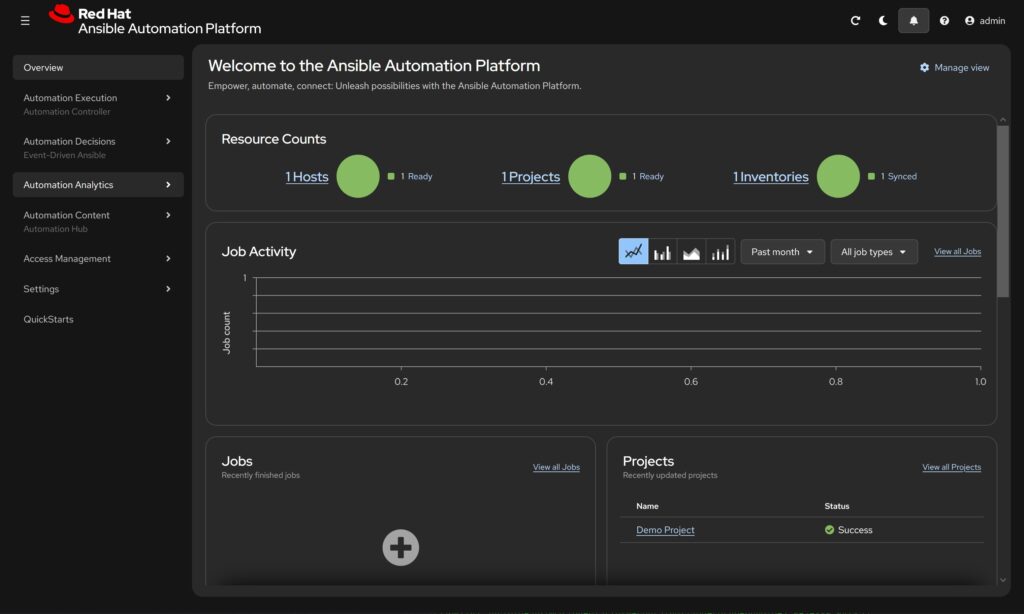
After the installation has finished we can log into the system using the username: admin and the password: password to a URL similar to https://lin2.fritz.box:443/. We need to enter our RedHat account in the “Username and Password” tab and accept the License Agreement. The main screen looks like this:
Have fun 🙂
Leave a Reply