Patching SQL Server
Keeping Microsoft SQL Server environments secure and up to date is one of the most important responsibilities of every SQL Server DBA and infrastructure team. Regular security patching not only helps protect critical business data against newly discovered vulnerabilities, but also improves system stability, reliability and compliance with modern security standards.
In this blog post, we will look at best practices for securing and patching SQL Server environments.
Getting the current installed Cumulative Update of a SQL Server
Before we start installing the newest Cumulative Update of SQL Server we need to check which one is currently installed. We can do this by running the following T-SQL statement
SELECT
    SERVERPROPERTY('ProductVersion') AS [Product Version],
    SERVERPROPERTY('ProductLevel') AS [Service Pack / CU],
    SERVERPROPERTY('ProductUpdateLevel') AS [Cumulative Update],
    SERVERPROPERTY('Edition') AS [Edition];
We will get an Output similar to the follwoing:
Product Version	Service Pack / CU	Cumulative Update	Edition
16.0.1000.6	RTM	                NULL	                Developer Edition (64-bit)
As we can see there is currently no Cumulative Update installed.
Getting the latest Cumulative Update
We can go to this Microsoft site and download the latest CU for our SQL Server version. In my case it is KB5081477 – Cumulative Update 25 for SQL Server 2022.
Installing the latest CU
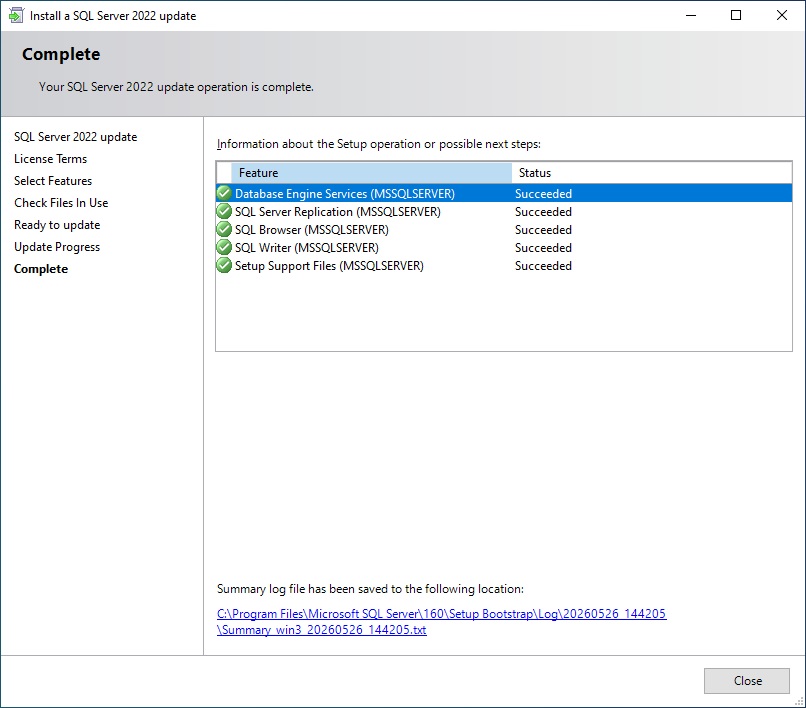
After we made a backup of the databases and have read the Documentation of the patch we can install it by starting SQLServer2022-KB5081477-x64. The installation procedure will stop the SQL Server service during the installation. The installation takes around 5 minutes in my case:
We can now also use the query from the first step again to show the newly installed CU:
Product Version	Service Pack / CU	Cumulative Update	Edition
16.0.4255.1	RTM	                CU25	                Developer Edition (64-bit)
Conclusion
Regular patching and proactive security management are essential parts of operating a stable and secure Microsoft SQL Server environment. A structured update strategy helps reduce security risks, improve system reliability and ensure long-term operational stability.
By combining proper testing, monitoring and maintenance procedures, organizations can significantly minimize downtime and protect critical business data against evolving threats.
I hope this article provides a useful overview and practical guidance for securing and maintaining SQL Server systems in daily DBA operations.
Leave a Reply