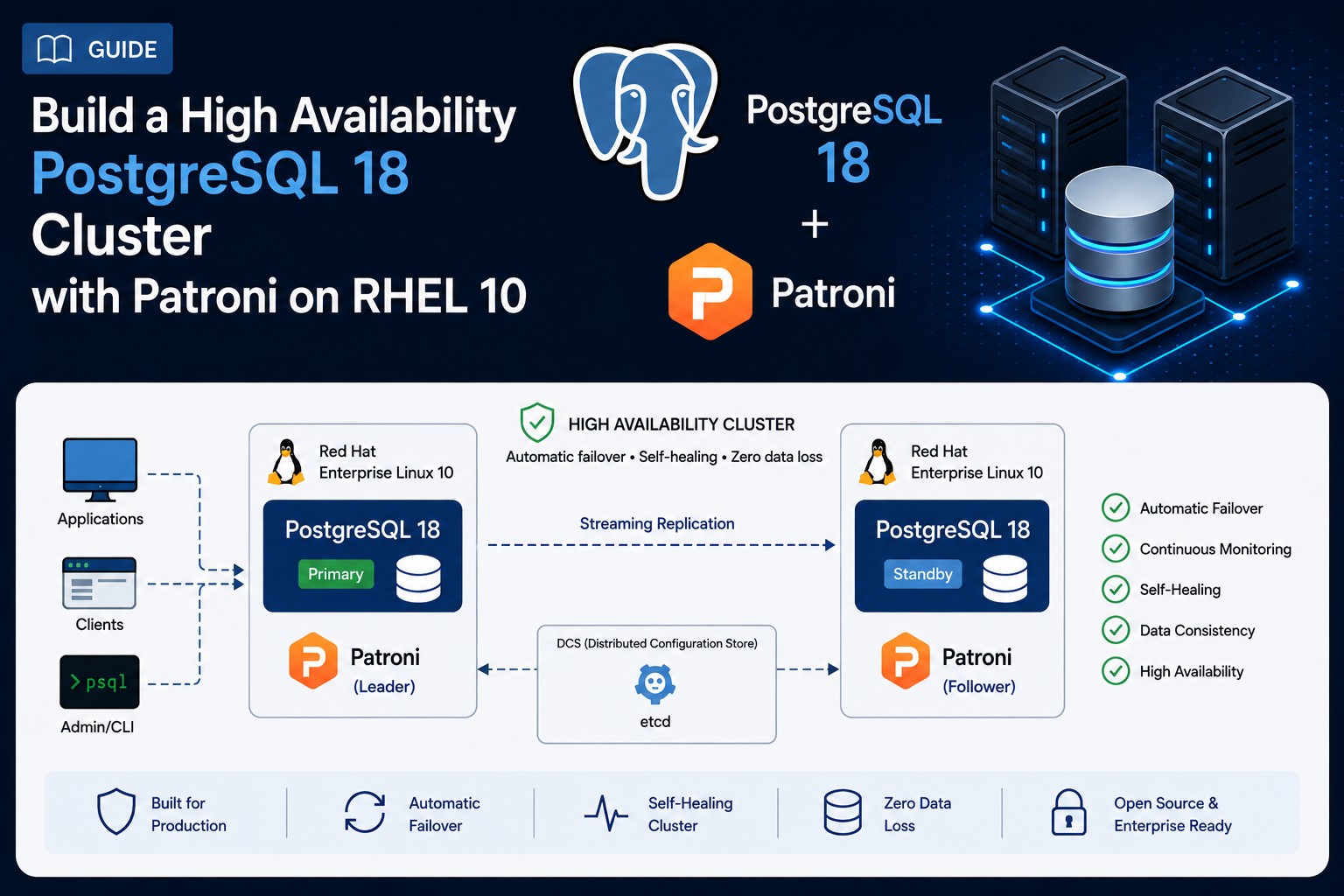
Deploying a High-Availability PostgreSQL 18 Cluster on RedHat 10 with Patroni
Introduction
PostgreSQL is one of the most powerful open-source relational databases, and PostgreSQL 18 brings even more performance, security, and scalability improvements. But how do you ensure high availability (HA) and automatic failover for your critical applications?
In this guide, we will walk you through setting up a PostgreSQL 18 cluster on three Red Hat Enterprise Linux 10 VMs using Patroni — a popular open-source tool for managing PostgreSQL HA clusters. All data on the leader node will be preserved and replicated to the other 2 nodes. By the end, you will have a fully redundant, self-healing database cluster ready for production workloads.
Why Patroni?
- Automatic failover: No manual intervention needed if the primary node fails.
- Synchronous replication: Data consistency across all nodes.
- REST API: Easy monitoring and management.
- Integration with etcd/consul: Distributed configuration and leader election.
Who is this for?
- DevOps engineers
- Database administrators
- Sysadmins managing critical PostgreSQL workloads
Architecture
Production / Large-Scale Environment Design
For large-scale production environments managing multiple Patroni PostgreSQL clusters (e.g., up to 10 clusters with 2–4 replicas each), the established best practice is to deploy a dedicated, external etcd cluster. We implement this using a 3‑node etcd ensemble (running exclusively etcd) to serve as the centralized Distributed Configuration Store (DCS) for all database clusters. This decoupled architecture ensures optimal resource isolation, prevents I/O and CPU contention with database workloads, simplifies operational maintenance (e.g., backups, monitoring, and upgrades), and guarantees a robust Raft consensus quorum for stable leader elections across the entire PostgreSQL fleet.
Test / Development Environment
In contrast, our test and development systems deliberately consolidate the stack to reduce infrastructure footprint and simplify bootstrapping. In this environment, we run PostgreSQL, Patroni, and etcd collocated on the same 3 nodes. While this all‑in‑one setup is perfectly sufficient for validation, functional testing, and rapid prototyping, we strictly avoid this configuration in production due to the increased risk of resource starvation and cascading failures when a single node becomes overloaded.
Prerequisites
Before we begin, ensure you have the following:
Hardware/Software Requirements
| Requirement | Details |
|---|---|
| Operating System | Red Hat Enterprise Linux 10 (RHEL 10) on all 3 nodes (Minimum 4GB RAM, 2 vCPUs, 50GB storage per VM). |
| Network | Static IPs for all nodes, firewall rules allowing traffic on ports 2379 (etcd), 5432 (PostgreSQL), 8008 (Patroni REST API) |
| Root/Sudo Access | Full administrative privileges on both VMs |
Assumptions
- All three nodes are fresh RHEL 10 installations as described in this post.
- You are comfortable with Linux command line and basic networking.
- You have sudo/root access on both VMs.
1. Install PostgreSQL 18
First we need to install PostgreSQL 18 on all 3 nodes as described in this post: 1. Installing PostgreSQL 18 on RHEL 10.
2. Prepare the OS
2.1 Install the required OS packages
The following packages need to be installed on all nodes:
# run as root on all nodes
dnf -y update
dnf install -y https://dl.fedoraproject.org/pub/epel/epel-release-latest-10.noarch.rpm
dnf config-manager --set-enabled codeready-builder-for-rhel-10-x86_64-rpms
dnf config-manager --enable pgdg-rhel10-extras
dnf -y install patroni patroni-etcd etcd
Note: The patroni-etcd package provides the necessary dependencies for Patroni to communicate with etcd.
2.2 (Optional) Configure firewalld
If you have a active firewall (firewalld) on the nodes you need to open specific ports to allow communication:
# run as root on all nodes
firewall-cmd --permanent --add-port={2379,2380}/tcp   # etcd
firewall-cmd --permanent --add-port={5432,5433}/tcp   # PostgreSQL
firewall-cmd --permanent --add-port=8008/tcp          # Patroni API
firewall-cmd --reload
3. Setup and Start etcd
In a Patroni cluster, etcd serves as the distributed consensus store that acts as the cluster’s “control plane.” Its primary job is to manage the leader election lock, ensuring that only one PostgreSQL node holds the Primary role at any given time. It also stores the definitive cluster state—including the current leader, replica positions (LSNs), and configuration—which all Patroni nodes continuously watch to stay synchronized. By providing strong consistency and fault-tolerance, etcd guarantees that Patroni can execute safe, automatic failovers without the risk of “split-brain” scenarios. The following script can be run on any of the three nodes as root. It will ask for the member nodes of the cluster (the first one entered will be the leader node where data will be preserved) and will create command snippets that need to be run on each node to configure and start etcd (The script by itself doesn’t change anything on the system):
#!/bin/bash
# etcd-config-generator

echo "=== etcd cluster configuration generator ==="
read -p "Enter comma separated node names (e.g., lin1,lin2,lin3): " NODES
[ -z "$NODES" ] && echo "No nodes given." && exit 1

read -p "Cluster token [etcd-cluster-01]: " TOKEN
TOKEN="${TOKEN:-etcd-cluster-01}"
read -p "Cluster state [new]: " STATE
STATE="${STATE:-new}"

IFS=',' read -ra NODE_ARRAY <<< "$NODES"

# Reset arrays to avoid duplicate accumulation when script is re-sourced
NAMES=()
IPS=()

for node in "${NODE_ARRAY[@]}"; do
    node="$(echo "$node" | xargs)"          # trim whitespace
    [ -z "$node" ] && continue
    NAMES+=("$node")
    # Resolve IP
    ip="$(getent ahosts "$node" 2>/dev/null | head -n1 | awk '{print $1}')"
    if [ -z "$ip" ]; then
        if [[ "$node" =~ ^[0-9]+\.[0-9]+\.[0-9]+\.[0-9]+$ ]]; then
            ip="$node"
        else
            echo "ERROR: Cannot resolve '$node' and it's not an IP." >&2
            exit 1
        fi
    fi
    IPS+=("$ip")
done

# Build initial cluster string
INITIAL_CLUSTER=""
for i in "${!NAMES[@]}"; do
    [ $i -gt 0 ] && INITIAL_CLUSTER+=","
    INITIAL_CLUSTER+="${NAMES[$i]}=http://${IPS[$i]}:2380"
done

# Generate snippets – each includes the systemctl start command
for i in "${!NAMES[@]}"; do
    name="${NAMES[$i]}"
    ip="${IPS[$i]}"
    echo "------------------------------------------------------------"
    echo "# On node $name (IP $ip), run the following block:"
    cat <<EOF
mkdir -p /etc/etcd
cat > /etc/etcd/etcd.conf <<'ETCDEOF'
# [Member]
ETCD_NAME="${name}"
ETCD_DATA_DIR="/var/lib/etcd/default.etcd"
ETCD_LISTEN_PEER_URLS="http://${ip}:2380"
ETCD_LISTEN_CLIENT_URLS="http://${ip}:2379,http://127.0.0.1:2379"

# [Clustering]
ETCD_INITIAL_ADVERTISE_PEER_URLS="http://${ip}:2380"
ETCD_ADVERTISE_CLIENT_URLS="http://${ip}:2379"
ETCD_INITIAL_CLUSTER="${INITIAL_CLUSTER}"
ETCD_INITIAL_CLUSTER_TOKEN="${TOKEN}"
ETCD_INITIAL_CLUSTER_STATE="${STATE}"
ETCDEOF
systemctl enable etcd --now
EOF
    echo
done
Sample Script Output (click to expand):
=== etcd cluster configuration generator ===
Enter comma separated node names (e.g., lin1,lin2,lin3): lin6,lin7,lin8
Cluster token [etcd-cluster-01]:
Cluster state [new]:
------------------------------------------------------------
# On node lin6 (IP 11.1.1.186), run the following block:
mkdir -p /etc/etcd
cat > /etc/etcd/etcd.conf <<'ETCDEOF'
# [Member]
ETCD_NAME="lin6"
ETCD_DATA_DIR="/var/lib/etcd/default.etcd"
ETCD_LISTEN_PEER_URLS="http://11.1.1.186:2380"
ETCD_LISTEN_CLIENT_URLS="http://11.1.1.186:2379,http://127.0.0.1:2379"

# [Clustering]
ETCD_INITIAL_ADVERTISE_PEER_URLS="http://11.1.1.186:2380"
ETCD_ADVERTISE_CLIENT_URLS="http://11.1.1.186:2379"
ETCD_INITIAL_CLUSTER="lin6=http://11.1.1.186:2380,lin7=http://11.1.1.195:2380,lin8=http://11.1.1.196:2380"
ETCD_INITIAL_CLUSTER_TOKEN="etcd-cluster-01"
ETCD_INITIAL_CLUSTER_STATE="new"
ETCDEOF
systemctl enable etcd --now

------------------------------------------------------------
# On node lin7 (IP 11.1.1.195), run the following block:
mkdir -p /etc/etcd
cat > /etc/etcd/etcd.conf <<'ETCDEOF'
# [Member]
ETCD_NAME="lin7"
ETCD_DATA_DIR="/var/lib/etcd/default.etcd"
ETCD_LISTEN_PEER_URLS="http://11.1.1.195:2380"
ETCD_LISTEN_CLIENT_URLS="http://11.1.1.195:2379,http://127.0.0.1:2379"

# [Clustering]
ETCD_INITIAL_ADVERTISE_PEER_URLS="http://11.1.1.195:2380"
ETCD_ADVERTISE_CLIENT_URLS="http://11.1.1.195:2379"
ETCD_INITIAL_CLUSTER="lin6=http://11.1.1.186:2380,lin7=http://11.1.1.195:2380,lin8=http://11.1.1.196:2380"
ETCD_INITIAL_CLUSTER_TOKEN="etcd-cluster-01"
ETCD_INITIAL_CLUSTER_STATE="new"
ETCDEOF
systemctl enable etcd --now

------------------------------------------------------------
# On node lin8 (IP 11.1.1.196), run the following block:
mkdir -p /etc/etcd
cat > /etc/etcd/etcd.conf <<'ETCDEOF'
# [Member]
ETCD_NAME="lin8"
ETCD_DATA_DIR="/var/lib/etcd/default.etcd"
ETCD_LISTEN_PEER_URLS="http://11.1.1.196:2380"
ETCD_LISTEN_CLIENT_URLS="http://11.1.1.196:2379,http://127.0.0.1:2379"

# [Clustering]
ETCD_INITIAL_ADVERTISE_PEER_URLS="http://11.1.1.196:2380"
ETCD_ADVERTISE_CLIENT_URLS="http://11.1.1.196:2379"
ETCD_INITIAL_CLUSTER="lin6=http://11.1.1.186:2380,lin7=http://11.1.1.195:2380,lin8=http://11.1.1.196:2380"
ETCD_INITIAL_CLUSTER_TOKEN="etcd-cluster-01"
ETCD_INITIAL_CLUSTER_STATE="new"
ETCDEOF
systemctl enable etcd --now

[root@lin6 ~]#
After the generated commands are run on all 3 nodes etcd should be active. You can verify the state of etcd with:
# run as root
etcdctl member list
# and with
etcdctl endpoint health --cluster
Expected Output:
[root@lin6 ~]# etcdctl member list
bbe914cd14e288f, started, lin7, http://11.1.1.195:2380, http://11.1.1.195:2379, false
2c828c931533228f, started, lin8, http://11.1.1.196:2380, http://11.1.1.196:2379, false
60432468aecdf222, started, lin6, http://11.1.1.186:2380, http://11.1.1.186:2379, false
[root@lin6 ~]# etcdctl endpoint health --cluster
http://11.1.1.186:2379 is healthy: successfully committed proposal: took = 3.529991ms
http://11.1.1.195:2379 is healthy: successfully committed proposal: took = 4.110628ms
http://11.1.1.196:2379 is healthy: successfully committed proposal: took = 12.164748ms
[root@lin6 ~]#
4. Setup and Start Patroni
Patroni is an open‑source “maestro” for PostgreSQL that automates high‑availability and replication management. Its primary job is to monitor the health of all PostgreSQL instances and orchestrate automatic failover—promoting a replica to primary if the current leader fails—without manual intervention. To coordinate this safely, Patroni relies on a distributed consensus store (etcd in our case) that holds the cluster’s state and manages leader election locks, ensuring every node agrees on who the primary is at all times. By combining robust health checks with a consistent control plane, Patroni gives you resilient, self‑healing PostgreSQL clusters that minimise downtime and data loss. The following steps will preserve the data on the leader node (the one entered first in the scripts node list), configure and start Patroni. Two replicas of the leader node will be created.
4.1 Create the PostgreSQL replication user
For the replication to work we need a PostgreSQL database user (rep_user) on the leader node:
# run as root on the leader node
su - postgres -c "psql -c \"create user rep_user with replication encrypted password 'changeme';\""
4.2 Configure and Start Patroni
First we need to stop and disable PostgreSQL 18 on all nodes. Also we disable automatic startup by systemd:
# run as root on all nodes
systemctl stop postgresql-18
systemctl disable postgresql-18
Now as we did for the etcd config we will run a script on one of the nodes that will create commands to run on each node. After that Patroni will be enabled and started:
#!/bin/bash
# patroni-config-generator – no bootstrap (manual user creation)

unset ORDERED_NAMES ORDERED_IPS UNIQUE_IPS

echo "=== Patroni cluster configuration generator ==="
echo "Note: The FIRST node you enter will be the initial leader."
read -p "Enter comma separated node names (e.g., lin1,lin2,lin3): " NODES
[ -z "$NODES" ] && echo "No nodes given." && exit 1

read -p "Cluster scope [pgcluster]: " SCOPE
SCOPE="${SCOPE:-pgcluster}"

read -p "Superuser password [changeme]: " SUPERPW
SUPERPW="${SUPERPW:-changeme}"

read -p "rep_user password [changeme]: " REPPW
REPPW="${REPPW:-changeme}"

read -p "Shared buffers [1GB]: " SHARED_BUFFERS
SHARED_BUFFERS="${SHARED_BUFFERS:-1GB}"

read -p "Max connections [200]: " MAX_CONNS
MAX_CONNS="${MAX_CONNS:-200}"

declare -A UNIQUE_IPS
ORDERED_NAMES=()
ORDERED_IPS=()

IFS=',' read -ra NODE_ARRAY <<< "$NODES"
for node in "${NODE_ARRAY[@]}"; do
    node="$(echo "$node" | xargs)"
    [ -z "$node" ] && continue
    ip="$(getent ahosts "$node" 2>/dev/null | head -n1 | awk '{print $1}')"
    if [ -z "$ip" ]; then
        if [[ "$node" =~ ^[0-9]+\.[0-9]+\.[0-9]+\.[0-9]+$ ]]; then
            ip="$node"
        else
            echo "ERROR: Cannot resolve '$node' and it's not an IP." >&2
            exit 1
        fi
    fi
    if [ -z "${UNIQUE_IPS[$ip]}" ]; then
        UNIQUE_IPS["$ip"]="$node"
        ORDERED_NAMES+=("$node")
        ORDERED_IPS+=("$ip")
    fi
done

LEADER="${ORDERED_NAMES[0]}"

# Build etcd3 hosts list
ETCD3_HOSTS=""
for ip in "${!UNIQUE_IPS[@]}"; do
    ETCD3_HOSTS+="    - ${ip}:2379\n"
done

# pg_hba: local + replication + general
PG_HBA_LINES="  - local all postgres peer\n"
for ip in "${!UNIQUE_IPS[@]}"; do
    PG_HBA_LINES+="  - host replication rep_user ${ip}/32 md5\n"
done
PG_HBA_LINES+="  - host all all 0.0.0.0/0 md5"

for i in "${!ORDERED_NAMES[@]}"; do
    name="${ORDERED_NAMES[$i]}"
    ip="${ORDERED_IPS[$i]}"
    echo "------------------------------------------------------------"
    echo "# On node $name (IP $ip), run the following block:"

    if [ "$name" == "$LEADER" ]; then
        CLEANUP_CMD=""
    else
        CLEANUP_CMD="rm -rf /var/lib/pgsql/18/data"
    fi

    cat <<EOF
mkdir -p /etc/patroni
cat > /etc/patroni/patroni.yml <<'PATRONIEOF'
scope: ${SCOPE}
name: ${name}

etcd3:
  hosts:
$(echo -e "$ETCD3_HOSTS")

postgresql:
  listen: ${ip}:5432
  connect_address: ${ip}:5432
  data_dir: /var/lib/pgsql/18/data
  bin_dir: /usr/pgsql-18/bin

  replication:
    listen: ${ip}:5433
    connect_address: ${ip}:5433
    username: rep_user
    password: ${REPPW}

  superuser:
    username: postgres
    password: ${SUPERPW}

  parameters:
    shared_buffers: ${SHARED_BUFFERS}
    max_connections: ${MAX_CONNS}

  pg_hba:
$(echo -e "$PG_HBA_LINES")

restapi:
  listen: ${ip}:8008
  connect_address: ${ip}:8008
PATRONIEOF

mkdir -p /etc/systemd/system/patroni.service.d
cat > /etc/systemd/system/patroni.service.d/override.conf <<'OVERRIDEEOF'
[Unit]
After=etcd.service
Wants=etcd.service
OVERRIDEEOF

systemctl daemon-reload
$( [ -n "$CLEANUP_CMD" ] && echo "$CLEANUP_CMD" )
systemctl enable patroni --now
EOF
    echo
done
Sample Output (click to expand)
=== Patroni cluster configuration generator ===
Note: The FIRST node you enter will be the initial leader.
Enter comma separated node names (e.g., lin1,lin2,lin3): lin6,lin7,lin8
Cluster scope [pgcluster]:
Superuser password [changeme]:
rep_user password [changeme]:
Shared buffers [1GB]:
Max connections [200]:
------------------------------------------------------------
# On node lin6 (IP 11.1.1.186), run the following block:
mkdir -p /etc/patroni
cat > /etc/patroni/patroni.yml <<'PATRONIEOF'
scope: pgcluster
name: lin6

etcd3:
  hosts:
    - 11.1.1.186:2379
    - 11.1.1.196:2379
    - 11.1.1.195:2379

postgresql:
  listen: 11.1.1.186:5432
  connect_address: 11.1.1.186:5432
  data_dir: /var/lib/pgsql/18/data
  bin_dir: /usr/pgsql-18/bin

  replication:
    listen: 11.1.1.186:5433
    connect_address: 11.1.1.186:5433
    username: rep_user
    password: changeme

  superuser:
    username: postgres
    password: changeme

  parameters:
    shared_buffers: 1GB
    max_connections: 200

  pg_hba:
  - local all postgres peer
  - host replication rep_user 11.1.1.186/32 md5
  - host replication rep_user 11.1.1.196/32 md5
  - host replication rep_user 11.1.1.195/32 md5
  - host all all 0.0.0.0/0 md5

restapi:
  listen: 11.1.1.186:8008
  connect_address: 11.1.1.186:8008
PATRONIEOF

mkdir -p /etc/systemd/system/patroni.service.d
cat > /etc/systemd/system/patroni.service.d/override.conf <<'OVERRIDEEOF'
[Unit]
After=etcd.service
Wants=etcd.service
OVERRIDEEOF

systemctl daemon-reload

systemctl enable patroni --now

------------------------------------------------------------
# On node lin7 (IP 11.1.1.195), run the following block:
mkdir -p /etc/patroni
cat > /etc/patroni/patroni.yml <<'PATRONIEOF'
scope: pgcluster
name: lin7

etcd3:
  hosts:
    - 11.1.1.186:2379
    - 11.1.1.196:2379
    - 11.1.1.195:2379

postgresql:
  listen: 11.1.1.195:5432
  connect_address: 11.1.1.195:5432
  data_dir: /var/lib/pgsql/18/data
  bin_dir: /usr/pgsql-18/bin

  replication:
    listen: 11.1.1.195:5433
    connect_address: 11.1.1.195:5433
    username: rep_user
    password: changeme

  superuser:
    username: postgres
    password: changeme

  parameters:
    shared_buffers: 1GB
    max_connections: 200

  pg_hba:
  - local all postgres peer
  - host replication rep_user 11.1.1.186/32 md5
  - host replication rep_user 11.1.1.196/32 md5
  - host replication rep_user 11.1.1.195/32 md5
  - host all all 0.0.0.0/0 md5

restapi:
  listen: 11.1.1.195:8008
  connect_address: 11.1.1.195:8008
PATRONIEOF

mkdir -p /etc/systemd/system/patroni.service.d
cat > /etc/systemd/system/patroni.service.d/override.conf <<'OVERRIDEEOF'
[Unit]
After=etcd.service
Wants=etcd.service
OVERRIDEEOF

systemctl daemon-reload
rm -rf /var/lib/pgsql/18/data
systemctl enable patroni --now

------------------------------------------------------------
# On node lin8 (IP 11.1.1.196), run the following block:
mkdir -p /etc/patroni
cat > /etc/patroni/patroni.yml <<'PATRONIEOF'
scope: pgcluster
name: lin8

etcd3:
  hosts:
    - 11.1.1.186:2379
    - 11.1.1.196:2379
    - 11.1.1.195:2379

postgresql:
  listen: 11.1.1.196:5432
  connect_address: 11.1.1.196:5432
  data_dir: /var/lib/pgsql/18/data
  bin_dir: /usr/pgsql-18/bin

  replication:
    listen: 11.1.1.196:5433
    connect_address: 11.1.1.196:5433
    username: rep_user
    password: changeme

  superuser:
    username: postgres
    password: changeme

  parameters:
    shared_buffers: 1GB
    max_connections: 200

  pg_hba:
  - local all postgres peer
  - host replication rep_user 11.1.1.186/32 md5
  - host replication rep_user 11.1.1.196/32 md5
  - host replication rep_user 11.1.1.195/32 md5
  - host all all 0.0.0.0/0 md5

restapi:
  listen: 11.1.1.196:8008
  connect_address: 11.1.1.196:8008
PATRONIEOF

mkdir -p /etc/systemd/system/patroni.service.d
cat > /etc/systemd/system/patroni.service.d/override.conf <<'OVERRIDEEOF'
[Unit]
After=etcd.service
Wants=etcd.service
OVERRIDEEOF

systemctl daemon-reload
rm -rf /var/lib/pgsql/18/data
systemctl enable patroni --now

[root@lin6 ~]#
The status of the Patroni cluster can be verified with the following command:
# run as root
patronictl -c /etc/patroni/patroni.yml list
After the replicas have been build the status should look similar to:
[root@lin6 ~]# patronictl -c /etc/patroni/patroni.yml list
+ Cluster: pgcluster (7672094740335959559) -+----+-------------+-----+------------+-----+
| Member | Host       | Role    | State     | TL | Receive LSN | Lag | Replay LSN | Lag |
+--------+------------+---------+-----------+----+-------------+-----+------------+-----+
| lin6   | 11.1.1.186 | Leader  | running   |  3 |             |     |            |     |
| lin7   | 11.1.1.195 | Replica | streaming |  3 |   0/5000218 |   0 |  0/5000218 |   0 |
| lin8   | 11.1.1.196 | Replica | streaming |  3 |   0/5000218 |   0 |  0/5000218 |   0 |
+--------+------------+---------+-----------+----+-------------+-----+------------+-----+
[root@lin6 ~]#
Congrats! You have a running 3 node Patroni Cluster.
Performing a switchover
The following command can be used on any running cluster node to switchover the leader to another node and setup the current leader as a replica from the new leader node:
# run as root
# show the current status
patronictl -c /etc/patroni/patroni.yml list
# switchover
patronictl -c /etc/patroni/patroni.yml switchover
# show the new status
patronictl -c /etc/patroni/patroni.yml list
Sample Output (click to expand):
[root@lin7 ~]# patronictl -c /etc/patroni/patroni.yml list
+ Cluster: pgcluster (7672094740335959559) -+----+-------------+-----+------------+-----+
| Member | Host       | Role    | State     | TL | Receive LSN | Lag | Replay LSN | Lag |
+--------+------------+---------+-----------+----+-------------+-----+------------+-----+
| lin6   | 11.1.1.186 | Leader  | running   |  3 |             |     |            |     |
| lin7   | 11.1.1.195 | Replica | streaming |  3 |   0/5000218 |   0 |  0/5000218 |   0 |
| lin8   | 11.1.1.196 | Replica | streaming |  3 |   0/5000218 |   0 |  0/5000218 |   0 |
+--------+------------+---------+-----------+----+-------------+-----+------------+-----+
[root@lin7 ~]# patronictl -c /etc/patroni/patroni.yml switchover
Current cluster topology
+ Cluster: pgcluster (7672094740335959559) -+----+-------------+-----+------------+-----+
| Member | Host       | Role    | State     | TL | Receive LSN | Lag | Replay LSN | Lag |
+--------+------------+---------+-----------+----+-------------+-----+------------+-----+
| lin6   | 11.1.1.186 | Leader  | running   |  3 |             |     |            |     |
| lin7   | 11.1.1.195 | Replica | streaming |  3 |   0/5000218 |   0 |  0/5000218 |   0 |
| lin8   | 11.1.1.196 | Replica | streaming |  3 |   0/5000218 |   0 |  0/5000218 |   0 |
+--------+------------+---------+-----------+----+-------------+-----+------------+-----+
Primary [lin6]:
Candidate ['lin7', 'lin8'] []: lin8
When should the switchover take place (e.g. 2026-08-10T11:25 )  [now]:
Are you sure you want to switchover cluster pgcluster, demoting current leader lin6? [y/N]: y
2026-08-10 10:26:03.98239 Successfully switched over to "lin8"
+ Cluster: pgcluster (7672094740335959559) ----+-------------+-----+------------+-----+
| Member | Host       | Role    | State   | TL | Receive LSN | Lag | Replay LSN | Lag |
+--------+------------+---------+---------+----+-------------+-----+------------+-----+
| lin6   | 11.1.1.186 | Replica | stopped |    |     unknown |     |    unknown |     |
| lin7   | 11.1.1.195 | Replica | running |  3 |   0/5000360 |   0 |  0/5000360 |   0 |
| lin8   | 11.1.1.196 | Leader  | running |  3 |             |     |            |     |
+--------+------------+---------+---------+----+-------------+-----+------------+-----+
[root@lin7 ~]# patronictl -c /etc/patroni/patroni.yml list
+ Cluster: pgcluster (7672094740335959559) -+----+-------------+-----+------------+-----+
| Member | Host       | Role    | State     | TL | Receive LSN | Lag | Replay LSN | Lag |
+--------+------------+---------+-----------+----+-------------+-----+------------+-----+
| lin6   | 11.1.1.186 | Replica | streaming |  4 |   0/50004A0 |   0 |  0/50004A0 |   0 |
| lin7   | 11.1.1.195 | Replica | streaming |  4 |   0/50004A0 |   0 |  0/50004A0 |   0 |
| lin8   | 11.1.1.196 | Leader  | running   |  4 |             |     |            |     |
+--------+------------+---------+-----------+----+-------------+-----+------------+-----+
[root@lin7 ~]#
Troubleshooting Common Issues
| Issue | Solution |
|---|---|
| Patroni fails to start | Check logs: journalctl -u patroni -f. Ensure etcd is running and reachable. |
| etcd cluster unhealthy | Restart etcd on both nodes: sudo systemctl restart etcd. Verify with etcdctl endpoint health --cluster. |
| PostgreSQL not starting | Check PostgreSQL logs. |
| Leader election stuck | Restart Patroni on both nodes. Check etcd for conflicts. |
Performance Tuning Tips
1. Adjust PostgreSQL Parameters (in patroni.yml):
The file is located here: /etc/patroni/patroni.yml
parameters:
  shared_buffers: 4GB
  effective_cache_size: 12GB
  work_mem: 64MB
  maintenance_work_mem: 2GB
  random_page_cost: 1.1
Ressources
The following links have further information about a Patroni PostgreSQL Cluster:
Conclusion
You have now successfully set up a highly available PostgreSQL 18 cluster on Red Hat 10 using Patroni and etcd. Here is a quick recap:
- Three-node PostgreSQL 18 cluster with automatic failover.
- Patroni manages leader election and replication.
- etcd ensures cluster state consistency.
Next Steps:
- Deploy a monitoring solution (Prometheus + Grafana).
- Set up regular backups (WAL archiving, pg_dump).
- Test failover scenarios in a staging environment.
- Scale the cluster by adding more nodes.
Final Thoughts:
This setup is production-ready but can be further customized based on your workload. Patronis REST API and etcd integration make it a robust choice for managing PostgreSQL HA clusters.
Happy clustering!
Leave a Reply